


A newspaper lying on its side

Drinking water fountains are flowing again

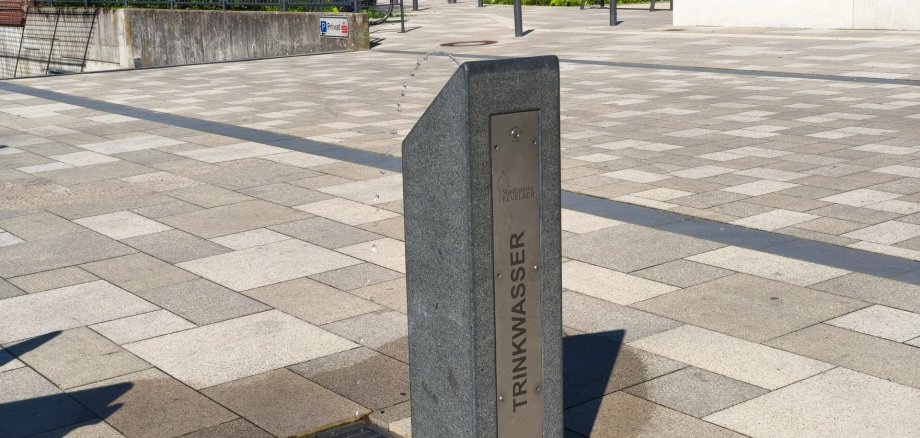
The three public drinking fountains operated by Stadtwerke Kevelaer are back in service. Following thorough cleaning and successful water testing, they are now available to all residents and visitors. In addition to the existing fountains at Kapellenplatz and in the Solegarten St. Jakob, the new drinking water fountain at Peter-Plümpe-Platz is now in operation for the first time. It is located near the underground parking garage entrance and the playground. This means there are now three public locations in the city where fresh drinking water can be accessed free of charge.

Barrier-free 

With a quick press of a button, fresh Kevelaer drinking water flows—ready to drink straight from the tap or to fill a bottle you’ve brought along. The granite and stainless steel fountains are designed to be accessible. With a spout height of about one meter, they can also be easily used by children. “Our fountains are designed to be particularly resource-efficient: water is dispensed only when needed, and automatic flushing ensures impeccable quality,” explains Dirk Verhoeven, pipeline network manager at Stadtwerke Kevelaer.

In winter, the systems are taken out of service to prevent frost damage. Before being put back into service, they are cleaned, inspected, and maintained. In addition, Stadtwerke Kevelaer supports the “Refill” initiative: At the office building at the water tower, located at Kroatenstraße 125, visitors can fill their own containers with fresh tap water for free.

Help with accessibility

  • General

    We endeavor to make our websites accessible. You can find details on this in our accessibility statement. You can send us suggestions for improvement via our feedback form Report accessibility.

  • Font size

    To adjust the font size, please use the following key combinations:

    Larger

    ⌘command
    +

    Smaller

    ⌘command

    Larger

    Ctrl
    +

    Smaller

    Ctrl
  • Keyboard navigation

    Use TAB and SHIFT + TAB to navigate through next/previous links, form elements and buttons.

    Use ENTER to open links and interact with elements.

  • Contrast mode

    Press the following key combination to reduce or increase the contrast:

    Enlarge

    ⌃control
    ⌥option
    ⌘command
    .

    Decrease

    ⌃control
    ⌥option
    ⌘command
    ,
    Note: The shortcuts must be activated in the system settings of the operating system.

    Press the left ALT key + left SHIFT key + PRINT to quickly switch the high contrast mode on or off.

  • Invert colors

    Press the following key combination to switch the color inversion on and off:

    ⌃control
    ⌥option
    ⌘command
    8
    Note: The shortcuts must be activated in the system settings of the operating system.

    First activate the screen magnifier and then switch the color inversion on and off with the following key combinations:

    1. screen magnifier

    +

    2. invert colors

    Ctrl
    Old
    I
  • Screen magnifier

    Press the following key combinations to use the screen magnifier:

    Switch on/off

    ⌥option
    ⌘command
    8

    Enlarge view

    ⌥option
    ⌘command
    =

    Reduce view

    ⌥option
    ⌘command
    Note: The shortcuts must be activated in the system settings of the operating system.

    Switch on / Enlarge view

    +

    Reduce view