City administration building of the Stadtkevelaer
> Translation notice: This page has been automatically translated with the support of DeepL. Differences from the original German text may occur. Only the German version is legally binding.

Playgrounds

Playground Commission Evaluates New Inclusive Play Equipment

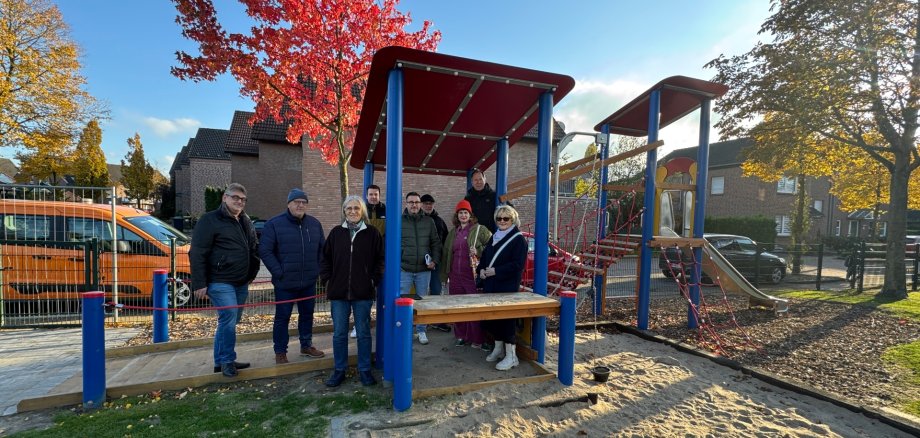
The playground committee of the pilgrimage town of Kevelaer visited the new attraction at the playground on Theodor-Heuss-Ring. There, Stadtwerke Kevelaer, in collaboration with the municipal maintenance department, has installed a new, inclusive play structure. Since September, the playground has finally been open for climbing, sliding, and playing together!

During their visit, the playground committee saw for themselves the wide variety of play options. Whether it’s the stainless-steel slide, the rope suspension bridge, the climbing net, or the wall bars—there’s plenty for children to discover and climb here. What makes it special: Thanks to a wheelchair-accessible walkway with handrails on both sides and wheel guards, as well as a wheelchair-accessible play table, children in wheelchairs can also use part of the playground equipment and are right in the middle of the action, rather than just on the sidelines.

“Play knows no bounds—and that’s exactly what we want to convey with this new playground structure,” says Mayor Dr. Dominik Pichler. “It’s great to see how the playground committee continues to prioritize variety and accessibility in its decisions.”

No employees found.

Help with accessibility

  • General

    We endeavor to make our websites accessible. You can find details on this in our accessibility statement. You can send us suggestions for improvement via our feedback form Report accessibility.

  • Font size

    To adjust the font size, please use the following key combinations:

    Larger

    ⌘command
    +

    Smaller

    ⌘command
    –

    Larger

    Ctrl
    +

    Smaller

    Ctrl
    –
  • Keyboard navigation

    Use TAB and SHIFT + TAB to navigate through next/previous links, form elements and buttons.

    Use ENTER to open links and interact with elements.

  • Contrast mode

    Press the following key combination to reduce or increase the contrast:

    Enlarge

    ⌃control
    ⌥option
    ⌘command
    .

    Decrease

    ⌃control
    ⌥option
    ⌘command
    ,
    Note: The shortcuts must be activated in the system settings of the operating system.

    Press the left ALT key + left SHIFT key + PRINT to quickly switch the high contrast mode on or off.

  • Invert colors

    Press the following key combination to switch the color inversion on and off:

    ⌃control
    ⌥option
    ⌘command
    8
    Note: The shortcuts must be activated in the system settings of the operating system.

    First activate the screen magnifier and then switch the color inversion on and off with the following key combinations:

    1. screen magnifier

    +

    2. invert colors

    Ctrl
    Old
    I
  • Screen magnifier

    Press the following key combinations to use the screen magnifier:

    Switch on/off

    ⌥option
    ⌘command
    8

    Enlarge view

    ⌥option
    ⌘command
    =

    Reduce view

    ⌥option
    ⌘command
    –
    Note: The shortcuts must be activated in the system settings of the operating system.

    Switch on / Enlarge view

    +

    Reduce view

    –