


A newspaper lying on its side

New Inclusive Play Equipment on Theodor-Heuss-Ring

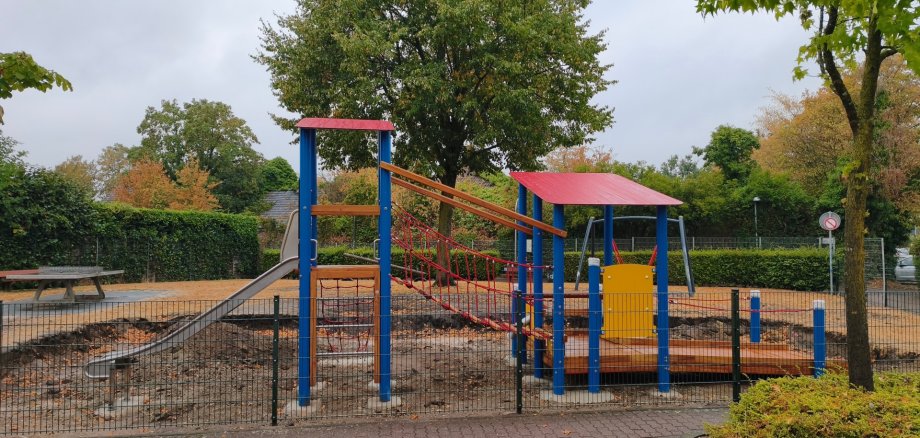
The playground on Theodor-Heuss-Ring will soon offer new opportunities for climbing, sliding, and playing together. Stadtwerke Kevelaer has added a new inclusive play structure to the playground. The new structure is expected to be available for use starting in early September.

The play structure offers a variety of play and climbing options. These include, among other things, a stainless steel slide, a rope suspension bridge, a mesh climbing wall, a ladder climbing wall, and a play table. A wheelchair-accessible walkway with handrails on both sides and wheel guards allows children in wheelchairs to use part of the play structure. The play table is also wheelchair-accessible.

The new playground equipment was selected by the playground committee. When choosing new equipment, the committee members place special emphasis on creating a variety of play options that encourage children’s imagination and creativity. Work on the playground is not yet complete. Therefore, the children will have to be patient a little longer: As things stand now, the new playground equipment is scheduled to open in early September.

Help with accessibility

  • General

    We endeavor to make our websites accessible. You can find details on this in our accessibility statement. You can send us suggestions for improvement via our feedback form Report accessibility.

  • Font size

    To adjust the font size, please use the following key combinations:

    Larger

    ⌘command
    +

    Smaller

    ⌘command

    Larger

    Ctrl
    +

    Smaller

    Ctrl
  • Keyboard navigation

    Use TAB and SHIFT + TAB to navigate through next/previous links, form elements and buttons.

    Use ENTER to open links and interact with elements.

  • Contrast mode

    Press the following key combination to reduce or increase the contrast:

    Enlarge

    ⌃control
    ⌥option
    ⌘command
    .

    Decrease

    ⌃control
    ⌥option
    ⌘command
    ,
    Note: The shortcuts must be activated in the system settings of the operating system.

    Press the left ALT key + left SHIFT key + PRINT to quickly switch the high contrast mode on or off.

  • Invert colors

    Press the following key combination to switch the color inversion on and off:

    ⌃control
    ⌥option
    ⌘command
    8
    Note: The shortcuts must be activated in the system settings of the operating system.

    First activate the screen magnifier and then switch the color inversion on and off with the following key combinations:

    1. screen magnifier

    +

    2. invert colors

    Ctrl
    Old
    I
  • Screen magnifier

    Press the following key combinations to use the screen magnifier:

    Switch on/off

    ⌥option
    ⌘command
    8

    Enlarge view

    ⌥option
    ⌘command
    =

    Reduce view

    ⌥option
    ⌘command
    Note: The shortcuts must be activated in the system settings of the operating system.

    Switch on / Enlarge view

    +

    Reduce view