

City administration building of the Stadtkevelaer

Equality

City administration trainees visit exhibition and workshops on the topic of "sexualized violence"

The traveling exhibition curated by Beatrix Wilmes shows items of clothing worn by 12 victims at the time of the assaults. Accompanying texts describe the experiences and make the crime and its effects public anonymously. "The exhibition was very moving and left me feeling angry, incomprehensible and disgusted," said one trainee. The main aim of the exhibition was to raise public awareness of sexualized violence and to address the issue of victim blaming. "It shouldn't matter what the person affected was wearing and thus suggest that they are partly to blame for the crime," says Equal Opportunities Officer Christiane Peulen. "In this way, the victims are condemned instead of the perpetrators. These myths and prejudices must disappear from our society and those affected must be supported."

Following the visit to the exhibition, two days of workshops on the topic of "sexualized violence in the workplace" were offered especially for the target group of trainees, accompanied by experienced experts. "The workshop offered loosened up the difficult topic somewhat with open discussions and exercises, which was good for all of us," reported the trainees from the pilgrimage town.
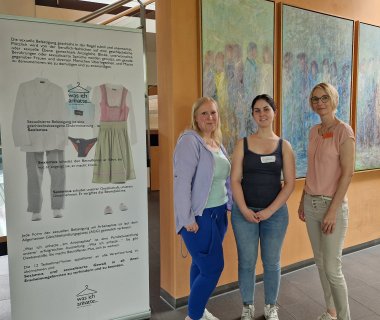
City administration trainees visited exhibition and workshops on the topic of "sexualized violence" in September 2024

The workshops aimed to shed light on the topic of sexualized violence in the workplace from different perspectives and offer the trainees assistance in dealing with such situations. "I don't think many of them were even aware that even verbal comments are part of sexualized violence," reported a trainee from the pilgrimage town of Kevelaer afterwards.

Despite the difficult topic, the visit was a valuable experience for the trainees. "At the end of the day, I went home feeling more hopeful," said one participant. "We hope that such topics will receive more attention in the future and that victims will receive more support," the participants agreed.

No employees found.

Help with accessibility

  • General

    We endeavor to make our websites accessible. You can find details on this in our accessibility statement. You can send us suggestions for improvement via our feedback form Report accessibility.

  • Font size

    To adjust the font size, please use the following key combinations:

    Larger

    ⌘command
    +

    Smaller

    ⌘command

    Larger

    Ctrl
    +

    Smaller

    Ctrl
  • Keyboard navigation

    Use TAB and SHIFT + TAB to navigate through next/previous links, form elements and buttons.

    Use ENTER to open links and interact with elements.

  • Contrast mode

    Press the following key combination to reduce or increase the contrast:

    Enlarge

    ⌃control
    ⌥option
    ⌘command
    .

    Decrease

    ⌃control
    ⌥option
    ⌘command
    ,
    Note: The shortcuts must be activated in the system settings of the operating system.

    Press the left ALT key + left SHIFT key + PRINT to quickly switch the high contrast mode on or off.

  • Invert colors

    Press the following key combination to switch the color inversion on and off:

    ⌃control
    ⌥option
    ⌘command
    8
    Note: The shortcuts must be activated in the system settings of the operating system.

    First activate the screen magnifier and then switch the color inversion on and off with the following key combinations:

    1. screen magnifier

    +

    2. invert colors

    Ctrl
    Old
    I
  • Screen magnifier

    Press the following key combinations to use the screen magnifier:

    Switch on/off

    ⌥option
    ⌘command
    8

    Enlarge view

    ⌥option
    ⌘command
    =

    Reduce view

    ⌥option
    ⌘command
    Note: The shortcuts must be activated in the system settings of the operating system.

    Switch on / Enlarge view

    +

    Reduce view